Free AU shipping30-day money-back1-year warrantyStripe secure checkout
Make your entry sound occupied
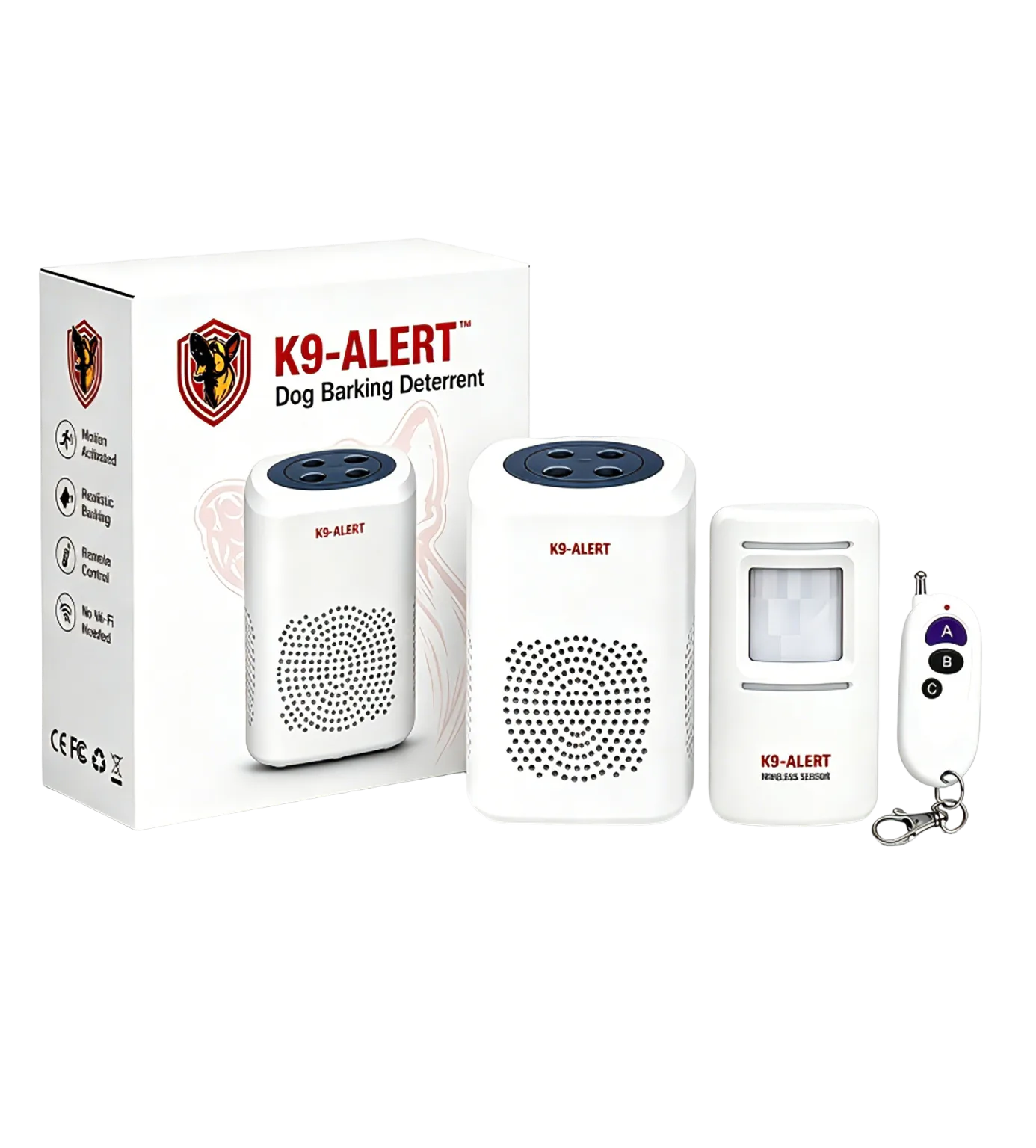
K9-Alert Barking Dog Alarm Kit
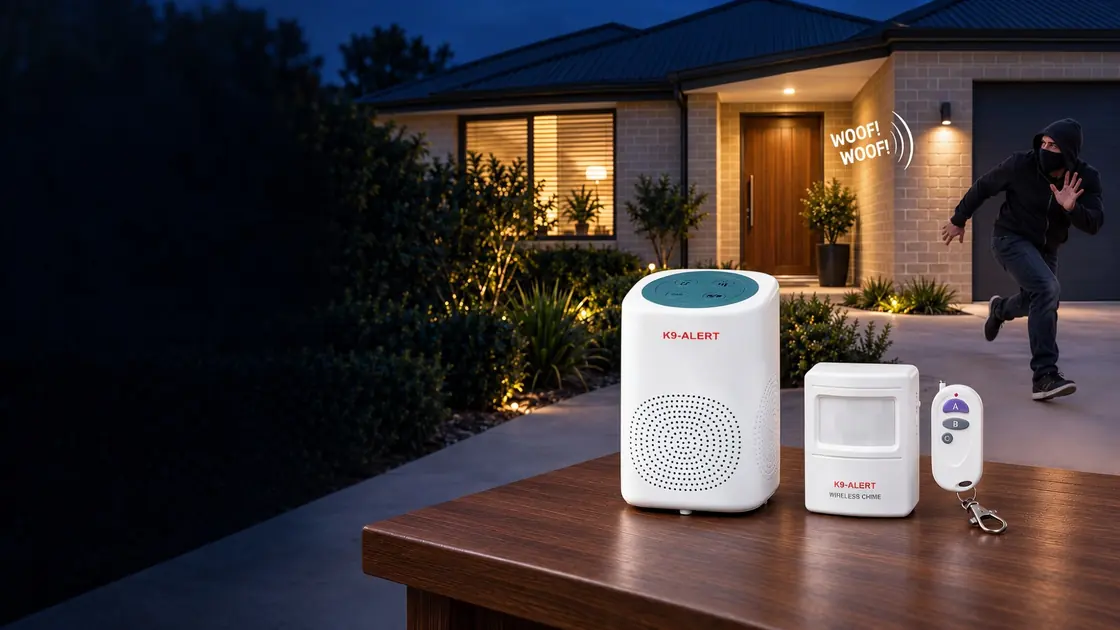
Barks before they reach the door. The wireless sensor goes
outside and spots someone walking up; the barking speaker sits
inside, behind your door, so it sounds like a real dog. No Wi-Fi.
No app. No monthly fee.
Motion-activated barking deterrentNo Wi-Fi, app or monthly feeRemote arm, disarm and SOS alarmUp to 110dB maximum volume
Product overview
One kit for one watched entry point.
The receiver plays alert sounds when the wireless motion sensor detects movement.
Use it as an audible deterrent around a door, garage, shed, shopfront, side gate
or storage area where a realistic barking sound helps create the impression that
someone is present.
or 4 interest-free payments of $23.75 with Afterpay — Zip also available
Buy 2+ kits and save 10%, 4+ kits and save 15% — applied automatically at checkout, no code needed. Australian back-to-base monitoring typically costs $30–60 per month (sources: Castle Security, Going Rate); K9-Alert is a one-off $95.00.
Motion-triggered response
Place the sensor where movement starts so the receiver can sound before someone reaches the protected point.
Remote control included
Arm, disarm or trigger the SOS alarm from the remote when you need immediate manual control.
Flexible offline operation
Works without internet coverage, which makes it practical for garages, sheds, rentals and small business spaces.
Add sensors later
One receiver works with up to 8 sensors, so you can cover another door or the shed without buying a second kit.
Selected customer reviews & feedback
4.9/5 for description accuracy.
Selected customer reviews, in their original wording. Description accuracy is a seller-service rating based on 33 ratings (last 12 months), separate from product ratings. Product star-rating breakdown: 4.2 out of 5 from 6 product ratings. The score covers all published product ratings, including ratings without written reviews. Transaction feedback does not change the star average; 63 feedback entries are automated. Includes feedback for the K9-Alert kit range; purchased configurations are shown individually.
When I ordered this, I wasn't really sure what to expect or how effective it would actually be. I have to say, this electronic watchdog is a really cool security deterrent.
As soon as the PIR sensor detects someone approaching the driveway or front door, it lets out a surprisingly realistic bark. It honestly caught us off guard. My youngest daughter came home and asked, "Mum, did we get a dog?" 😂
It offers four different barking modes, plus an SOS mode if needed. I also like that it can be powered by either USB or batteries, giving you a couple of installation options.
The best part is that it doesn't rely on Wi-Fi. It's quick to set up, uses a wireless PIR sensor and produces a loud, realistic bark that should make unexpected visitors think twice. The remote control also has excellent range, making it easy to control from a distance.
My only real criticism is that the PIR sensor isn't waterproof, so it needs to be installed under an eave, porch or other covered area if used outdoors. If your front door or garage isn't sheltered, that does limit placement a little. Thankfully, I have a large front porch, so it wasn't an issue for me.
Overall, it's not your typical home security device, but it's definitely a clever and effective deterrent, really good for seniors or anyone that lives alone. I'd happily recommend it.
Verified customer review
★★★★★ · 5 / 5
Not a dog, dont have to feed it or walk it.
K9 Alert has worked as advertised. The remote control is good. The range of the sensor is longer that I thought, facing it 30deg down still gives 8 meters range for an approaching pedestrian. Battery life for speaker and sensor is good so far.
I've had 2 visitors so far ask where I bought it.
Verified customer review
★★★★★ · 5 / 5
Loud, Convenient and Great for Home Security
I’ve been using this for a while now, and it’s become a regular part of my nightly routine. I usually activate it with the remote before going to bed and turn it off again in the morning, which makes it really easy to use.
There are quite a few dog sounds available, and I have to say, some of them sound incredibly realistic. The first couple of times I heard it unexpectedly, I genuinely got a fright 😂
Out of curiosity, I also checked the volume with a sound meter and it reached around 116 dB when measured up close, which was much louder than I expected.
I mainly purchased it as an additional security measure for the house, particularly when we’re away travelling. Of course, it doesn’t replace a proper alarm system or security cameras, but hearing a dog barking when someone approaches gives me some extra peace of mind when the house is empty.
It was easy to set up, the remote control is very convenient, and it has worked exactly as I hoped so far. Overall, I’m very pleased with it.
Read more customer reviews
Verified customer review
★★★★★ · 5 / 5
Reliable and Effective Offline Deterrent for Home Security
I set this barking motion sensor up near my side gate to add an extra layer of security, and it has worked perfectly. The dog barking sound is surprisingly realistic and loud enough to easily be heard from the street, which gives me great peace of mind that it will effectively deter uninvited visitors.
Setting it up was incredibly simple since it works completely offline without needing a WiFi connection or a complex smartphone app. The remote control is very responsive, making it easy to arm or disarm the system before I head out into the yard. The PIR sensor has a great detection arc that accurately picks up movement without false alarms. It is an excellent, budget-friendly security addition for any home or garage.
Pros: Loud, realistic 110dB barking sounds that effectively mimic a real guard dog. Completely hassle-free setup that requires no WiFi, apps, or monthly subscription fees. Versatile dual-power options allowing you to use either USB cables or standard batteries.
Cons: The sensor requires sheltered outdoor placement as it is not fully waterproof. Batteries for the main receiver and motion sensor are not included in the box.
Verified customer review
No star rating provided
Bloody awesome 👌 scares the shot out of me too, cause I forgot where I put it 😆 🤣 😂
Bloody awesome 👌 scares the shot out of me too, cause I forgot where I put it 😆 🤣 😂
Verified customer review
No star rating provided
Working well to protect my shed
Working well to protect my shed
Verified customer review
No star rating provided
Good value
Good value
Verified customer review
No star rating provided
Seller very pleasant to deal with Very happy with Item Exactly as advertised. Will buy again.
Seller very pleasant to deal with Very happy with Item Exactly as advertised. Will buy again.
Verified customer review
No star rating provided
Received item great to deal with
Received item great to deal with
Verified customer review
No star rating provided
Thankyou prompt delivery
Thankyou prompt delivery
Verified customer review
No star rating provided
Realistic dog barking sound, good volume
Realistic dog barking sound, good volume Very realistic dog barking sound and high volume. My neighbor’s dog started barking as well after hearing my barking alarm, it really works well. I put the sensor on the garage wall, and the alarm device inside the garage, it is a good way to frighten away intruders tried to break in, feel safe with this product at home.
Verified customer review
No star rating provided
Easy to set up and very practical
Easy to set up and very practical. The barking sound is loud and realistic enough to act as a deterrent, especially for a garage, shed or front entry. I like that it does not need Wi-Fi and comes with a remote control. It is not a full security system, but for extra peace of mind it does the job well.
Verified customer review
No star rating provided
Very practical little security device
Very practical little security device. Easy to set up and the barking sound is surprisingly loud and realistic. I use it near the front door at night and it gives an extra sense of security without needing complicated installation. Good value for the price and works as described. Fast delivery too. Recommended. Good condition
Verified customer review
No star rating provided
Great product, great service.
Great product, great service.
Verified customer review
No star rating provided
Quick delivery right price
Quick delivery right price
Verified customer review
No star rating provided
Easy to install. Works great. Definitely let's you know if someone moves within it's range.
Easy to install. Works great. Definitely let’s you know if someone moves within it’s range.
Verified customer review
No star rating provided
Great quality product, value for money. As described. Easy transaction & pick up. Excellent seller, prompt service, friendly & very helpful. A+++++. Thank you so much 😊
Great quality product, value for money. As described. Easy transaction & pick up. Excellent seller, prompt service, friendly & very helpful. A+++++. Thank you so much 😊
Verified customer review
No star rating provided
Fast friendly seller and fast delivery
Fast friendly seller and fast delivery
Verified customer review
No star rating provided
Good quality materials
Good quality materials
Verified customer review
No star rating provided
received barking dog alarm today thank you kind regaeds
received barking dog alarm today thank you kind regaeds
Verified customer review
No star rating provided
Good
Good
Verified customer review
No star rating provided
Fast delivery. Thank you.
Fast delivery. Thank you.
Verified customer review
No star rating provided
quick postage and well packed- Thank you!
quick postage and well packed- Thank you!
Verified customer review
No star rating provided
Love it great ebayer
Love it great ebayer
Verified customer review
No star rating provided
Thanks great product
Thanks great product
Verified customer review
No star rating provided
It works really good
It works really good
Verified customer review
No star rating provided
All Good!
All Good!
Verified customer review
No star rating provided
Very happy with service and product and delivery 🚚
Very happy with service and product and delivery 🚚
Verified customer review
No star rating provided
Works well
Works well
Verified customer review
No star rating provided
great product with multiple realistic dog barking sounds
great product with multiple realistic dog barking sounds
Verified customer review
No star rating provided
All good thanks
All good thanks
Verified customer review
No star rating provided
Very good quality
Very good quality
Verified customer review
No star rating provided
Great product as described good value and quuck postage
Great product as described good value and quuck postage
Verified customer review
No star rating provided
Works well
Works well
Verified customer review
No star rating provided
Fast service, Professional and Prompt response for any enquiry regarding the product.
Fast service, Professional and Prompt response for any enquiry regarding the product.
Verified customer review
No star rating provided
Good quality and swift delivery
Good quality and swift delivery
Verified customer review
No star rating provided
Good item thanks
Good item thanks
Setup guide
5-minute setup walkthrough
No drilling needed: use the included adhesive pads (screws are in the box if you prefer). The receiver and sensor are pre-paired in the box.
1
Unbox
Take out the receiver, sensor, remote, USB cable and mounting hardware.
2
Power the receiver
Use USB power or insert 4 × AA batteries. Batteries are not included.
3
Power the sensor
Use USB power or insert 3 × AAA batteries. Batteries are not included.
4
Test the link
Wave a hand in front of the sensor. The receiver should bark within 1 second.
5
Place the sensor
Aim it across the approach path to your protected point (door, gate, garage entry), not directly at the door itself. See placement tips below.
6
Arm it with the remote
Press A on the remote. Its red light flashes once to confirm it's armed.
Done. You can rearrange placement any time without rewiring. If anything in steps 1–4 doesn't work, email support@k9alert.com.au with your order number — we'll usually have you running in one reply.
Power options
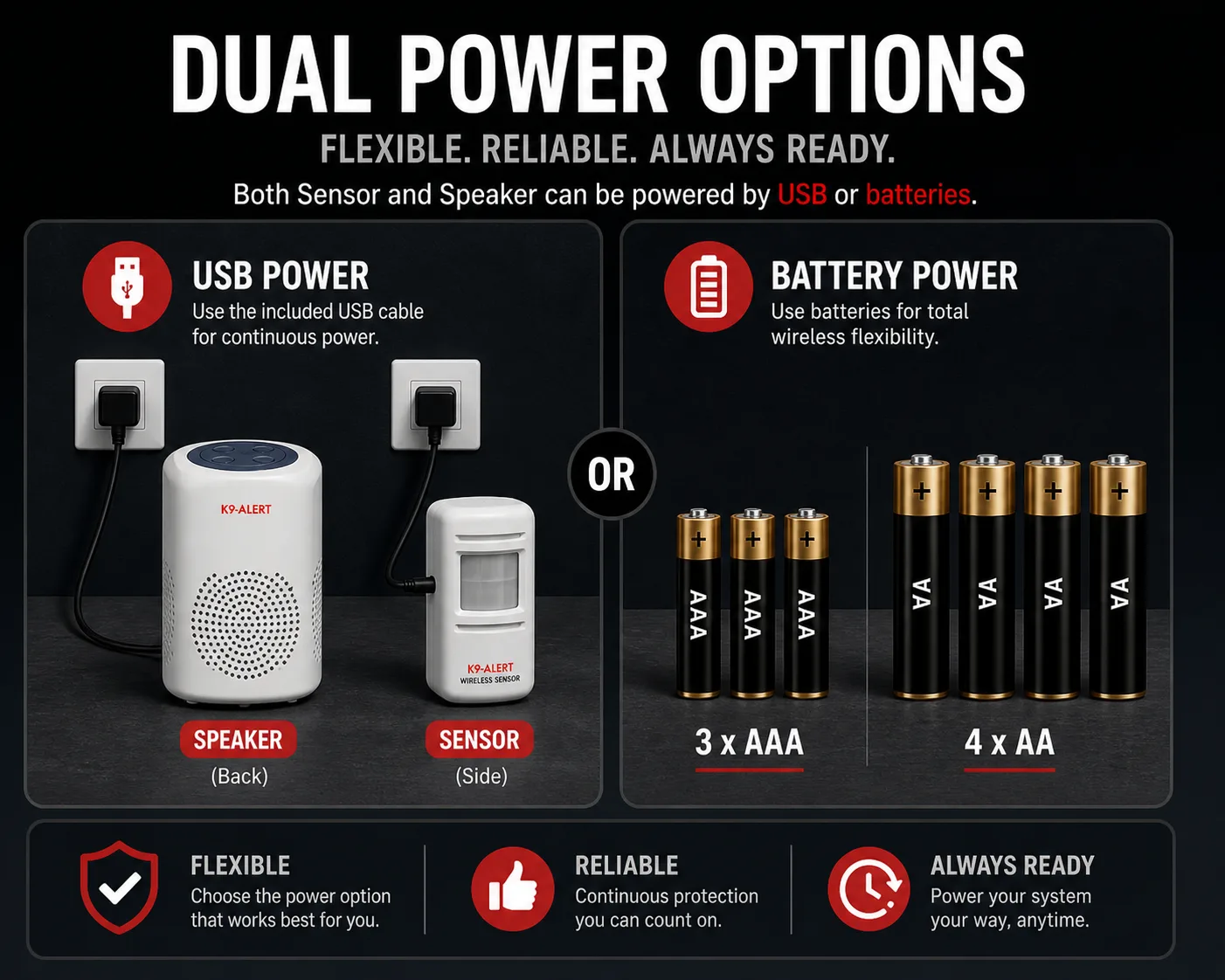
Dual power options for flexible placement.
Use USB power for continuous operation where a power point is available, or choose
battery power when the sensor or receiver needs to sit away from a socket.
USB power
Both the sensor and receiver support USB power. Each unit needs its own power source.
Battery power
Use 3 × AAA batteries for the sensor and 4 × AA for the receiver. Batteries are not included.
Always ready
Low-voltage detection helps indicate when the receiver batteries need attention.
Controls and sound
Top control panel keeps daily use simple.
The receiver has physical controls for the everyday actions people expect from an
audible deterrent: arming, volume, emergency alarm and sound mode selection.
Arming / disarmingArm or disarm the system.
Volume levelAdjust the receiver sound volume.
Emergency alarmTrigger a high-priority SOS alarm.
Song selection keySwitch between 4 sound modes on the front controls.
These details combine the packaging highlights, supplied product images and manual
information so the page explains the full kit instead of only the headline feature.
Detection range0-7m
Approximate motion detection coverage in a sector around 110 degrees.
Stealth modeLight off
Press the sensor's TEST button once to keep its red detection light off, so the barking does not look like it comes from a device.
Measured in open space; walls and metal doors shorten it.
Sound outputUp to 110dB
Four volume levels for adapting the receiver to different spaces and times of day.
Sound selection11 selectable tones
Includes barking sounds, ding-dong, alarm, welcome and other selectable alerts.
Pairing256 selectable codes
Switch codes if a neighbour runs a K9-Alert too, so the two kits don't set each other off.
Battery reminderLow-voltage detection
The receiver can prompt battery replacement when voltage is low.
Installation guide
Where to mount the sensor
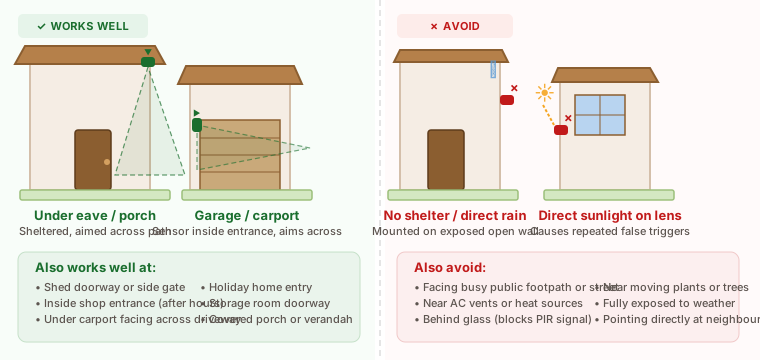
Placement is the single biggest factor in performance. The sensor works well in sheltered outdoor and indoor positions — the diagram below shows what works and what to avoid.
Honest placement guide
Common false triggers and how to avoid them
Every motion sensor — including this one — can be triggered by something other than a person. Here's the honest list and the fix:
Trigger
Why it happens
How to reduce it
Possums, cats, foxes
Body heat + movement crossing the sensor's 110° arc
Aim the sensor 50–80 cm above ground, angled slightly downward and across the path. Animals usually pass under the detection cone.
Direct sunlight on the sensor
Rapid temperature change on the lens
Place the sensor in a shaded or covered position. Never point it directly at a window the sun rises or sets through.
Heating / cooling vents
Warm or cold air moving across the lens
Don't point the sensor at an air conditioner outlet, heater or fridge condenser.
Reflective metal surfaces
Heat reflection off metal (roller doors in afternoon sun)
Place sensor on a side wall instead of opposite the metal door.
Heavy rain on a covered sensor
Some sensors mistake rain spray for movement
Use a sheltered position; the sensor is rated for indoor / covered placement, not direct outdoor exposure.
An occasional false trigger will happen: how often depends on the weather and whether the sensor sits in direct sun. Good placement keeps it rare. If you're getting more than that, email support@k9alert.com.au with a photo of your placement — we'll tell you what to adjust.
In the box
What's included in the kit.
One K9-Alert kit covers one watched entry point. Mounting hardware and a USB power
cable are included. For battery operation, use 3 × AAA for the sensor and 4 × AA
for the receiver; batteries are not included.
Barking dog alarm receiver
Wireless motion sensor
Remote control for arm, disarm and SOS alarm
USB power cable
Mounting bracket and screws
Adhesive mounting pads
Printed setup guide
Need to watch more than one entry point? The
2-zone kit adds a second sensor and the
3-zone kit adds a third — all paired to
the same receiver.
Where it fits
Front doors, garages, shop entries, sheds, rentals, side gates, storage rooms and
driveways where movement is detected before the protected area is reached.
No. The barking is an electronic recording designed as a deterrent. It is not a monitored alarm and does not notify anyone remotely — it works by making the property sound occupied.
Does the sensor light up when it detects someone?
By default the sensor shows a small red light when it detects movement. If you would rather nobody could tell the barking is coming from a device, press the TEST button on the side of the sensor once. It still detects movement and triggers the receiver, but the red light stays off.
How loud is 110dB?
110dB is approximately the level of a rock concert at close range. For reference, a normal conversation is around 60dB, a lawnmower around 90dB and a jackhammer around 100dB. At max volume, K9-Alert is clearly audible from outside the protected space.
Can the sensor be used outdoors — for example on a driveway?
Yes, in sheltered outdoor positions. Mount it under an eave, covered porch, carport or garage entrance and it handles normal nearby rain without issue. For a driveway, fix it under a carport or eave and aim it across the approach rather than pointing into open sky. Avoid positions where rain hits the sensor directly, or where strong direct sunlight shines onto the lens all day.
Can one receiver work with two sensors — front and back?
Yes. One receiver works with multiple sensors at the same time. A sensor near the front entry and another near the back entrance will both trigger the same receiver inside — no second siren needed for most homes. Up to 8 sensors can pair to one receiver. Email support@k9alert.com.au for pairing help.
Can I adjust the sensor sensitivity?
There is no sensitivity dial — the detection zone is fixed at roughly 0–7 m across a 110° arc. Placement controls the effective range: aim it across the approach rather than head-on, raise it slightly and tilt it downward to reduce small-animal pickup, and keep it shaded from direct sunlight and away from heat sources or moving plants.
Does it replace locks or cameras?
No. Use K9-Alert as an audible deterrent layer alongside sensible locks, lighting and storage habits.
Can the layout expand later?
Yes. Customers can order an extra wireless sensor for $39.95. One sensor can pair with multiple receivers, or multiple sensors can pair with one receiver. Contact support@k9alert.com.au for pairing help.
Do you offer a discount for buying more than one kit?
Yes. Orders of 2 or more kits save 10%, and orders of 4 or more kits save 15%. The discount applies automatically in Stripe checkout once the minimum quantity is reached — no coupon code needed.
How do I know K9-Alert is a real Australian business?
K9-Alert is sold by RED SHIELD PTY LTD (ABN 89 691 324 268), a registered Australian company based at 163-179 Foster Road, Mount Waverley VIC 3149. You can look up the ABN yourself on the Australian Business Register website. Orders ship from a Melbourne warehouse, payment is processed by Stripe, and support@k9alert.com.au is answered by a real person within 24 hours AEST on business days.
Buy with confidence
Sold, shipped and supported from Melbourne.
30-day money-back
Full refund of the product price within 30 days of delivery. Return postage is paid by you, the customer.
1-year warranty
Manufacturing faults under normal use are replaced at our cost or repaired.
Free tracked shipping
Dispatched from our Melbourne warehouse, tracked to your door.
We confirm whether it's covered (manufacturing fault under normal use = yes)
We ship replacement at our cost, or arrange repair
Your Australian Consumer Law rights apply on top of this — we don't try to waive them
Not covered: physical damage from drops, water damage outside sheltered placement, batteries leaking from being left in the unit for months while not in use.
How reviews are verified
We publish customer feedback only when it can be tied to a real K9-Alert order, shown with buyer handles, source and scenario context, unedited. We do not use anonymous testimonials, owner-written praise or unverifiable star ratings. To share yours, email support@k9alert.com.au from your order email.
Ready to order
Make your entry sound occupied.
Free tracked AU shipping. See your estimated delivery date at checkout. Every kit comes with a 30-day money-back guarantee.